YouTube Channel Art: Creating a Professional Banner
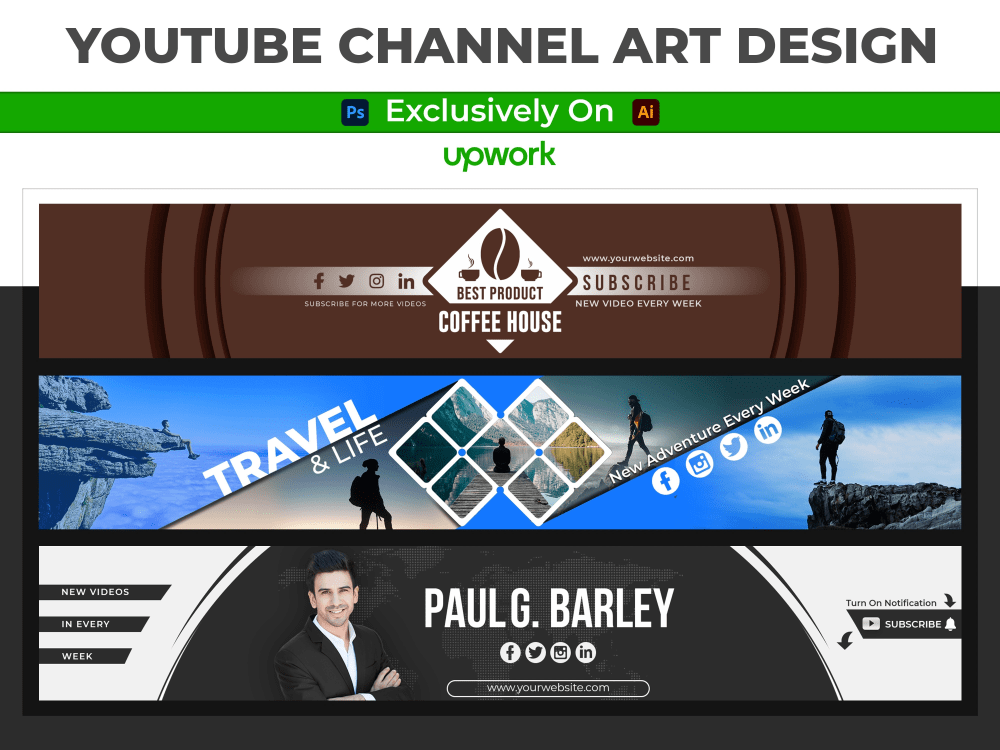
Level Up Your You Tube Game: Creating a Killer Channel Banner
Want to make your You Tube channel look legit? Learn how to create professional You Tube channel art that attracts subscribers and boosts your brand!
Hey friends! Ever landed on a You Tube channel and thought, "Wow, this looksgood"? It's not just the videos; it's the whole package. And guess what's a huge part of that package? Your channel art, that big banner staring back at everyone. Think of it as the storefront of your You Tube shop. You wouldn't want a dingy, poorly lit storefront, would you? Of course not! You want something eye-catching, professional, and that screamsyou.
But let's be honest, designing channel art can feel like trying to solve a Rubik's Cube blindfolded. You've got image sizes to worry about, text that disappears on different devices, and the constant fear of looking like you designed it in MS Paint circa 1998. We've all been there. Staring blankly at a canvas, wondering where to evenbegin.
It's frustrating, right? You pour your heart and soul into creating awesome content, but then people bounce because your channel looks… well,amateur. It's like showing up to a job interview in your pajamas. You might be brilliant, but the first impression isn't exactly stellar.
That's where this guide comes in. We're going to break down the process of creating a killer You Tube channel banner, step-by-step. We're talking about everything from understanding the tech specs to crafting a design that reflects your brand and attracts subscribers. No more pixelated messes or disappearing text. Just pure, unadulterated channel artawesomeness.
We'll even touch on common mistakes people make – like using blurry images or overloading the banner with information – so you can avoid those pitfalls and create something truly professional. And don't worry, you don't need to be a graphic design guru to pull this off. We'll keep it simple, practical, and even a little fun.
Ready to transform your You Tube channel from "meh" to "magnificent"? Then keep reading, because we're about to unlock the secrets to creating a You Tube channel banner thatactuallyworks!
Understanding You Tube Channel Art:The Basics
What is You Tube Channel Art and Why Does it Matter?
You Tube channel art, also known as a channel banner or header image, is the large rectangular graphic that sits at the top of your You Tube channel page. It's prime real estate on your channel, serving as a visual introduction to your brand and content. It's the first thing visitors see, so it needs to make a strong impression.
Why does it matter? Simple: first impressions. Think of it like this: when someone stumbles upon your channel, they're making a split-second decision about whether to stick around. A well-designed channel banner can grab their attention, communicate what your channel is about, and entice them to subscribe. A poorly designed banner, on the other hand, can send them running for the hills (or, more accurately, back to the search results).
It's also aboutbranding. Your channel art is an opportunity to showcase your brand's personality, style, and values. Use consistent colors, fonts, and imagery to create a cohesive look that reinforces your brand identity. This helps viewers recognize your channel and content across different platforms. A good banner tells a story, while a bad banner just sits there.
Finally, it's aboutvisibility. A well-optimized channel art can even help your channel rank higher in search results. Include relevant keywords in your banner's text to improve your channel's search engine optimization (SEO). We'll get into the specifics later, but it's worth keeping in mind.
You Tube Banner Size and Dimensions: Avoiding the Dreaded Crop
Alright, let's talk numbers. The ideal You Tube banner size is2560 x 1440 pixels. Yes, that's a big number. But here's the kicker:not all of that space is visible on every device. You Tube uses a responsive design, which means your banner will be displayed differently on desktops, tablets, and mobile phones.
This is where the "safe area" comes in. The safe area, also known as the "text and logo safe area," is the central portion of your banner that will be visible on all devices. It's typically1546 x 423 pixels. This is where you should place your most important information, such as your channel name, logo, tagline, and any calls to action. This is themoney zonefor most You Tubers.
So, what happens to the rest of the banner? Well, on larger screens like TVs, the entire 2560 x 1440 pixel image will be visible. But on smaller screens, the sides of the banner will be cropped off. That's why it's crucial to keep your key elements within the safe area to avoid any unfortunate cropping mishaps.
Think of it like framing a picture. You want to make sure the subject is centered and visible, even if the frame is slightly cropped. Same principle applies to You Tube channel art.
Tools for Creating You Tube Channel Art:From Free to Fancy
Okay, so you knowwhatchannel art is andwhyit matters. Now let's talk abouthowto create it. The good news is, you don't need to be a Photoshop wizard to design a professional-looking banner. There are plenty of user-friendly tools available, ranging from free options to more advanced paid software.
Here are a few popular choices: Canva:This is a fantasticfreeoption for beginners. Canva offers a wide range of pre-designed templates, drag-and-drop tools, and a library of images and fonts. It's incredibly easy to use, even if you have no design experience.
Adobe Spark: Another greatfreetool from Adobe. It offers similar features to Canva, with a focus on creating engaging graphics for social media. It also features a plethora of You Tube banner templates to help you get started.
Pic Monkey: A paid option that offers more advanced features and customization options than Canva and Adobe Spark. It's still relatively easy to use, but it gives you more control over your design.
Adobe Photoshop: The industry standard for graphic design. If you're serious about creating professional-quality channel art, Photoshop is the way to go. However, it has a steeper learning curve and requires a paid subscription.
GIMP: Afreeand open-source alternative to Photoshop. It offers many of the same features, but it can be a bit more challenging to learn.
The best tool for you will depend on your budget, skill level, and design needs. If you're just starting out, Canva or Adobe Spark are excellent choices. If you're a more experienced designer, Photoshop or GIMP might be a better fit. The key is to experiment and find the tool that works best for you.
Designing Your You Tube Channel Art: A Step-by-Step Guide
Defining Your Brand: What's Your Channel All About?
Before you start slapping images and text onto a canvas, take a step back and ask yourself: what is my channel all about? What is your brand? What is your niche? What is your target audience? What message are you trying to convey?
Your channel art should be a reflection of your brand's identity. It should communicate your channel's purpose, personality, and values. Here are some questions to consider: What is your channel's niche? Are you a gaming channel, a beauty channel, a cooking channel, or something else entirely? Who is your target audience? Are you targeting teenagers, young adults, parents, or a different demographic? What is your brand's personality? Are you fun and quirky, serious and professional, or somewhere in between? What are your brand's colors, fonts, and logo? These elements should be consistent across all of your branding materials, including your channel art. What is your value proposition? What unique value do you offer to your viewers? Why should they subscribe to your channel?
Once you have a clear understanding of your brand, you can start to translate that into your channel art design.
Choosing the Right Images: High-Quality Visuals are Key
Images are a crucial element of your You Tube channel art. They can grab viewers' attention, communicate your brand's personality, and create a visually appealing design. But not all images are created equal.Blurry, low-resolution images will make your channel look unprofessional. Always use high-quality visuals that are crisp, clear, and properly sized.
Here are some tips for choosing the right images: Use high-resolution images. Aim for images that are at least 2560 x 1440 pixels. This will ensure that your banner looks sharp on all devices. Choose images that are relevant to your channel's niche. If you're a gaming channel, use images of video game characters or gameplay footage. If you're a beauty channel, use images of makeup, skincare products, or yourself. Use images that are consistent with your brand's style. If your brand is fun and quirky, use playful and colorful images. If your brand is serious and professional, use clean and minimalist images. Avoid using copyrighted images. Always use images that you have the right to use. You can find free stock photos on websites like Unsplash, Pexels, and Pixabay.
Crafting Compelling Communicating Your Message Clearly
Text is another important element of your You Tube channel art. It can communicate your channel's name, tagline, value proposition, and call to action. But just like with images, it's important to use text effectively.
Here are some tips for crafting compelling Keep it concise. Don't overload your banner with too much text. Stick to a few key phrases that communicate your message clearly. Use a legible font. Choose a font that is easy to read on all devices. Avoid using overly decorative or stylized fonts. Use a font size that is large enough to read easily. The text should be visible even on small screens like mobile phones. Use contrasting colors. Make sure your text stands out against the background image. Use a light-colored text on a dark background, or vice versa. Include a call to action. Encourage viewers to subscribe to your channel by including a call to action like "Subscribe Now!" or "Join the Community!"
Arranging Your Elements: Creating a Balanced and Appealing Design
Once you have your images and text, it's time to arrange them into a cohesive design. This is where the magic happens. The key is to create a balanced and visually appealing layout that draws the eye and communicates your message effectively.
Here are some tips for arranging your elements: Keep your key elements within the safe area. As mentioned earlier, the safe area is the central portion of your banner that will be visible on all devices. Place your channel name, logo, tagline, and call to action within this area. Use white space effectively. Don't cram too many elements into your banner. Leave some empty space around your images and text to create a clean and uncluttered look. Use visual hierarchy. Guide the viewer's eye by placing the most important elements in prominent positions. Use larger fonts, brighter colors, or more eye-catching images to draw attention to these elements. Consider the overall composition. Make sure your banner looks balanced and visually appealing from a distance. Step back from your screen and take a look at the overall design.
Optimizing Your You Tube Channel Art: Making it Work for You
Keyword Optimization: Improving Your Channel's Search Ranking
Believe it or not, your You Tube channel art can actually help improve your channel's search ranking. By including relevant keywords in your banner's text, you can signal to You Tube's algorithm what your channel is about. This can help your channel appear higher in search results when people are looking for content related to your niche.
Here are some tips for keyword optimization: Identify relevant keywords. Think about the terms that people are likely to use when searching for content like yours. Use keyword research tools like Google Keyword Planner or Ahrefs to find high-volume keywords with low competition. Include your target keywords in your banner's text. Incorporate your keywords naturally into your channel name, tagline, or description. Don't stuff your banner with keywords. Avoid overusing keywords or using them in a way that sounds unnatural. Focus on creating a clear and compelling message that is also optimized for search.
Mobile Optimization: Ensuring a Great Experience on All Devices
With more and more people watching You Tube videos on their mobile devices, it's crucial to make sure your channel art looks good on smartphones and tablets. As mentioned earlier, the safe area is the key to mobile optimization. By keeping your key elements within the safe area, you can ensure that they are visible on all devices.
Here are some additional tips for mobile optimization: Use a responsive design. Choose a design that adapts to different screen sizes. Test your banner on different devices. Check how your banner looks on your smartphone, tablet, and desktop computer. Simplify your design. Avoid using too many elements or complex graphics that might look cluttered on small screens.
Testing and Iteration: Finding What Works Best
Creating a great You Tube channel art is an iterative process. Don't be afraid to experiment with different designs, images, and text until you find something that works best for you.
Here are some tips for testing and iteration: Get feedback from your viewers. Ask your viewers what they think of your channel art. Use polls or surveys to gather feedback. Track your channel's performance. Monitor your channel's views, subscribers, and engagement metrics. See if there is a correlation between your channel art and your channel's performance. A/B test different designs. Try using two different channel art designs for a period of time and see which one performs better. Don't be afraid to change your channel art. Your channel art doesn't have to be set in stone. Feel free to update it periodically to reflect your evolving brand and content.
Common Mistakes to Avoid: You Tube Channel Art Pitfalls
Blurry Images and Low Resolution: The Cardinal Sin
We've said it before, but it bears repeating: avoid blurry images and low resolution like the plague. Nothing screams "amateur hour" like a pixelated channel banner. Always use high-quality visuals that are crisp, clear, and properly sized.
Overloading with Information: Keep it Simple, Stupid (KISS)
Resist the urge to cram too much information into your channel art. A cluttered banner is distracting and overwhelming. Focus on communicating your key message clearly and concisely. Remember the KISSprinciple: Keep It Simple, Stupid.
Inconsistent Branding: Creating a Disconnected Experience
Your channel art should be consistent with your overall branding. Use the same colors, fonts, and imagery across all of your branding materials, including your channel art, thumbnails, and social media profiles. This will create a cohesive and professional experience for your viewers.
Ignoring the Safe Area: Cropping Nightmares
Failing to account for the safe area is a recipe for disaster.Make sure your key elements are visible on all devicesby placing them within the safe area. Otherwise, you risk having your channel name, logo, or call to action cropped off on smaller screens.
Not Optimizing for Mobile: Missing Out on Mobile Viewers
In today's mobile-first world, optimizing your channel art for mobile devices is essential.Make sure your banner looks good on smartphones and tabletsby using a responsive design and simplifying your layout.
Wrapping Up: Your Path to You Tube Channel Art Mastery
Congratulations, friends! You've made it to the end of our guide on creating a killer You Tube channel banner. We've covered a lot of ground, from understanding the basics of channel art to designing a visually appealing and optimized banner that reflects your brand and attracts subscribers.
Now, let's recap the key takeaways: You Tube channel art is your channel's storefront. It's the first thing visitors see, so it needs to make a strong impression. Use the correct banner size and dimensions. The ideal size is 2560 x 1440 pixels, but remember the safe area! Define your brand. Your channel art should reflect your channel's purpose, personality, and values. Choose high-quality images. Blurry images are a big no-no. Craft compelling text. Communicate your message clearly and concisely. Arrange your elements effectively. Create a balanced and visually appealing layout. Optimize for keywords and mobile devices. Improve your channel's search ranking and ensure a great experience on all devices. Avoid common mistakes. Blurry images, overloading with information, and ignoring the safe area are just a few of the pitfalls to watch out for.
Now it's time to take action!Head over to your favorite design tool and start creating your new You Tube channel banner. Don't be afraid to experiment, get creative, and have fun with it. The best channel art is a reflection of your unique personality and brand.
And if you're feeling stuck or overwhelmed, remember that you can always come back to this guide for a refresher. We're here to support you on your You Tube journey.
So go out there and create a channel banner that will wow your viewers and help you achieve your You Tube goals! What amazing thing areyougoing to make?

Post a Comment for "YouTube Channel Art: Creating a Professional Banner"
Post a Comment